
ue Lyra 动画系统(持续更新)
前言
先占坑 后续补上 ALS 使用基础
前期准备
放入资产,导入俩个插件
Animation Warping Animation
Locomotion Library
骨骼为 SK_Mannequin
基础移动
动画蓝图
基础创建
创建ABP_CharacterBase 放入到 BP_Player 中,设置Level的GameMode为 MyGameMode。MyGameMode 的默认Pawn为BP_Player。
New State Machine –> Locomotion_SM
- Inertialization 连接 惯性混合 注:这边先放着
- 加State : Idel Start Stop Cycle
状态机条件:
重载函数
BlueprintThreadSafeUpdateAnimation 蓝图线程安全更新动画
这个函数主要负责收集游戏数据,并将其处理为选择和驱动动画的有用信息。
线程安全函数的一个注意事项是,我们不能像在事件图中那样直接访问游戏对象的数据,这是因为其他线程可能在同一时间运行,他们可能正在改变这些数据。
相反,我们使用属性访问系统来访问数据。在安全的情况下,属性访问系统会自动复制数据, 下面是一个例子,我们访问典当所有者的位置(从上下文菜单中搜索”属性访问”).
创建自定义函数
- Update Velocity Data
- Details -> Advanced -> Thread Safe
- 设置:高级 -> 线程安全 (这样才能在BlueprintThreadSafeUpdateAnimation使用这个函数)
- 计算 World Velocity,World Velocity 2D,Local Velocity 2D,Has Velocity
- Update Rotation Data:
- GetOwningActor.GetActorRotation
- 计算 World Rotation
- Update Acceleration Data
- 计算 World Acceleration,World Acceleration 2D,Local Acceleration 2D,Has Acceleration
- Update Velocity Data
FSM
1 | Locomotion_SM: |
动画层接口
创建一个 ALI_AnimLayerInterface 动画层蓝图
创建四个Layer
FullBody_Idle
FullBody_Start
FullBody_Cycle
FullBody_Stop
ABP_CharacterBase 继承ALI_AnimLayerInterface
- 在bp: ABP_CharacterBase -> Class Setting -> Details -> Implemented Interfaces -> Add -> ALI_AnimLayerInterface
编译后把四个Layer拖入FSM的节点中
创建 ABP_ItemLayersBase 也继承于 ALI_AnimLayerInterface
这个类用于实现逻辑
FullBody_Idle:
- Sequence Player
- bp: Sequence Player -> Details -> Settings -> Sequence -> Bind -> 新建Anim Sequence 的变量 Idle
同理所有Layer处理
- 在start 和 stop 中 bp: Sequence Player -> Details -> Settings -> Loop Animation -> False
创建 ABP_ItemLayersBase 子蓝图 ABP_Pistol_Layers
bp: ABP_Pistol_Layers - > Anim Preview Editor -> Default -> 设置动画
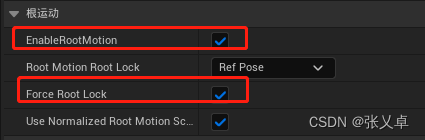
打开动画的根运动和强制骨骼锁定
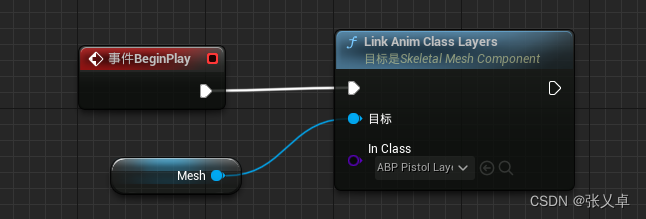
在ABP_Character中Link Anim Class Layers
距离匹配-步幅匹配-同步组
距离匹配
前置需要插件 Animation Locomotion Library
Start
ABP_ItemLayersBase -> Sequence Evaluator -> Datail -> Settings -> Sequence (Bind Start) , Explicit Time (Dynamic), Should Loop (F) ,Teleport to Explicit Time (F)
Explicit Time 显式时间:动画Timeline中的播放到哪一帧的时间
新建函数 On Become Relevant -> SetUpStartAnim ,On Update-> Update Start Anim
- SetUpStartAnim
- 初始化 Set Explicit Time (0)
- Update
- UpdateStartAnim
- 设置Explicit Time 使用 Advance Time By Distance Matching
- “Advance Time By Distance Matching”:基本原理是根据角色在游戏世界中的实际移动距离来计算动画的播放时间。例如,如果角色在一帧内移动了1米,那么动画将播放1米对应的时间。这样,动画的播放速度将根据角色的实际移动速度进行调整,从而使动画与实际移动更加协调。
- Anim
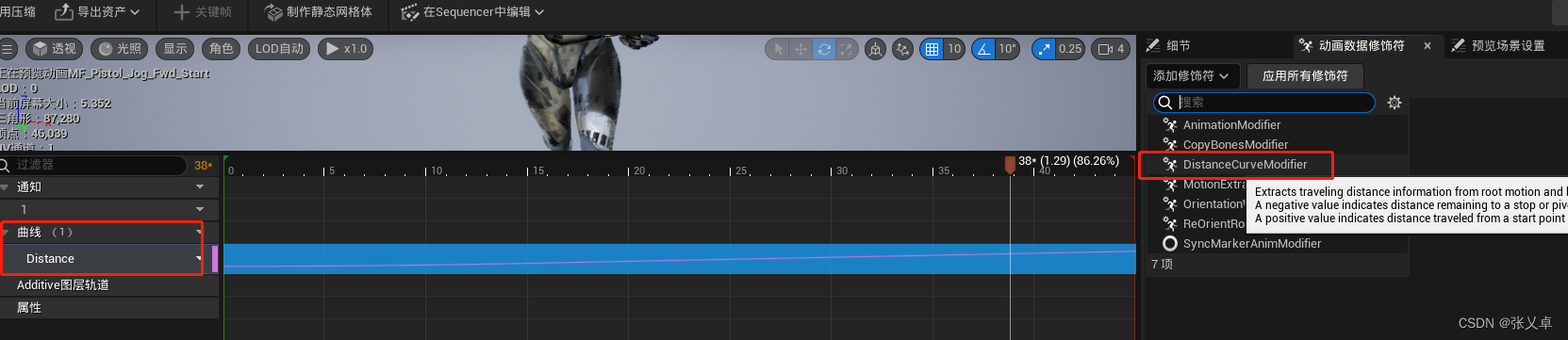
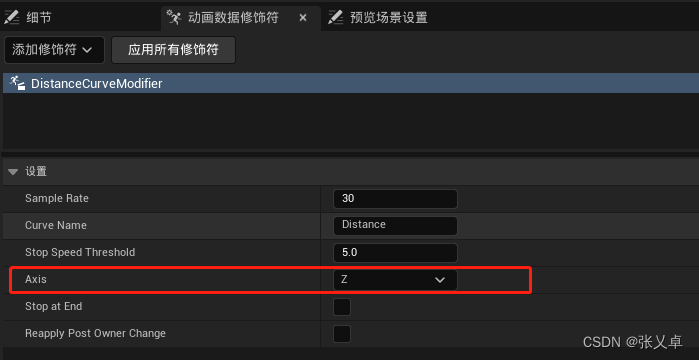
- 在Anim中 添加修饰符 DistanceCurveModifier
- LocamotionDistance Curve Name:指动画的动画曲线名字,由Locomotion 插件生成的可以删除Distance, 由动画数据修饰符重新引用就创建出来了
- 压缩需要修改 为 UniformAnimCurveCompression
- 这边新建一个解码器设置为Uniform Indexable 并把所有相关动画压缩
- UpdateStartAnim
压缩: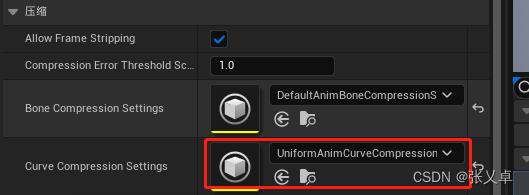
Cycle
循环动画,修改播放率
- Update Cycle Anim
- 并且勾上LoopAnimation
- 使用Set Playrate to Match Speed
Stop
利用预测停止点处理
- Update Stop Anim
- if 有速度 and 没有加速度
- Predict Ground Mevement Stop Location
- if stop Loaction > 0.0
- T-Distance Match to Target
- F-Advance Time
步幅匹配
动画在不同速度下,跨的幅度不一样
在Start 和 Cycle动画添加跨步扭曲,Stop不用设置设置移动速率 作为跨步的参数
FullBody_Start
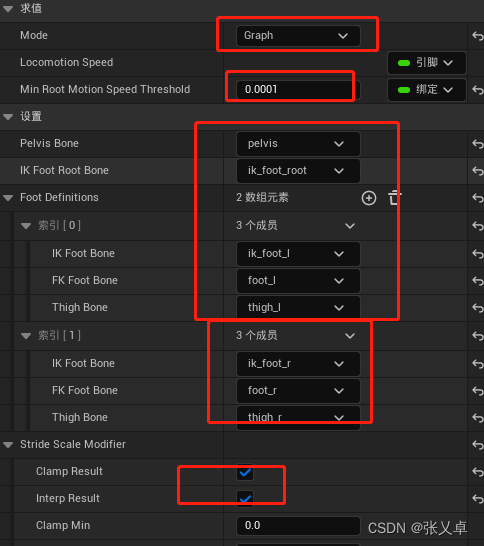
连接 Stride Warping (跨步扭曲) — 通过以指定缩放和朝向扭曲腿步伐来调整动画的速度。
bp Stride Warping
同步组
同步组(Sync Groups) 可用于在混合过程中自动同步相关动画的长度和播放,从而改善动画蓝图(Animation Blueprints) 中的混合行为。在混合拥有不同长度周期的步行和跑步动画时,这很有用。如果没有同步组,直接从一个周期混合到另一个周期可能会导致效果不自然,因为脚的落点可能不同步。
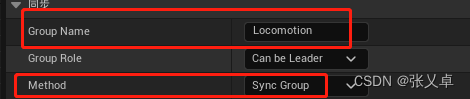
- bp 序列求值器
- Group Name -> Loacomotion
- Method -> Sync Group
- Anim
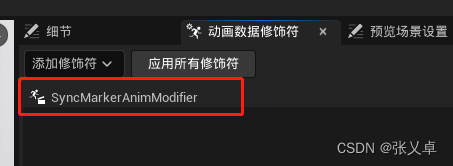
- 修饰符 -> SyncMarkerAnimModifier
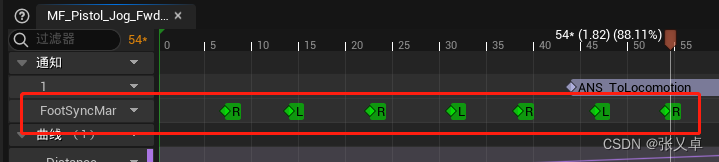
- 这个左右脚落下会有标记
在 Layer动画节点 设置同步组名称和同步组
八方向
获取当前方向
ABP_CharacterBase
Update Velocity Data
- 判断 Is Move Last Update 是否为最后一帧更新速度
Update Direction from Velocity
- 计算 Local Velocity Angle
- 传入 2 Use Current Direction
- 方向 Direction from Velocity = Select Cardinal Direction from Angle(Angle , Dead Zone , Is Move Last Update => Use Current Direction , Current Direction)
- new AnimDirEnumClass[forward,back,left,right]
- 判断旋转方向计算 返回 AnimDirEnumClass 45°角
修改动画序列
ABP_ItemLayersBase
新建一个AnimDirStruct 为 AnimDirEnumClass 和 AnimSequence 的映射
- Setup Start Anim
- Set Sequence(AnimDirEnumClass.forward => Sequence )
- Update Start Anim
- Set Sequence with Inertial Blending(AnimDirEnumClass.forward => Sequence )
Start Sequence设置为
ABP_Pistol_Layers
赋值 AnimDirStruct 中四个映射 (forward,back,left,right) * 三个状态 (Start,Cycle,Stop)
朝向扭曲
ABP_ItemLayersBase
- 在FullBodyStart中 连接朝向扭曲
AnimStart
- 添加修饰符 DistanceCurveModifier
BP_Character
- Orient Rotation to Movement - F
- Use Controller Rotation Yaw - T
处理动画压缩格式
回转运动
回转运动:当角色向当前运动的相反方向移动时的一种动画过渡行为,具体表现是继续朝当前方向运动后停止再朝反方向运动
线程安全函数
ABP_CharacterBase
Update Cardinal Direction From Acceleration()
- 计算加速度方向
- 调用自定义函数 Select Cardinal Direction From Angle()
状态机
ABP_CharacterBase
- Pivot Sources
- 是Start 和 Cycle状态别名
- Pivot
- 回转状态
ALI_AnimLayerInterface
- 新建动画层FullBody_Pivot
ABP_ItemLayersBase
- FullBody_Pivot 创建FSM
- 由于当前不支持状态重新输入,因此需要两个状态才能在回转运动之间混合
- 反复横跳的状态,需要及时切换回转动画。但不支持输入导致SetUp状态只会执行一次
- PivotA
- 朝向扭曲和跨步扭曲
- PivotB
状态机条件
ABP_CharacterBase
- Pivot Sources -> Pivot
- dot(Local Velocity 2D,Local Acceleration 2D) < 0
- v和a 为反向
Pivot -> Cycle
- Pivot -> Stop
- Not Has Acceleration
ABP_ItemLayersBase
- PivotA -> PivotB
- ToRePivot => 速度与加速度相反&初始加速度与当前加速度相反&不是垂直方向
- 惯性化
- PivotB -> PivotA
- ToRePivot
动画层操作
ABP_ItemLayersBase
- Setup Pivot Anim
- 根据 DirectionFromAcceleration 设置动画 并设置加速度方向
- Update Pivot Anim
- 距离匹配,这边有俩段动画 一段start 一段stop,和上节方法一样
- 速度与加速度相反?start : stop
- Pivot start
- 不使用预测停止点(Advance Time By Distance Matching)
- 使用预测回转点(Predict Ground Movement Pivot Location)
- Pivot stop
- 使用 预测停止点(Advance Time By Distance Matching)
动画操作
Pivot Anim
- 新建AnimNotifyState ANS_To_Locomotio
- 处理Pivot Anim 四方向 ANS_To_Locomotion 的时间长度
- 添加同步组
ABP_Pistol_Layers 赋值 Pivot Cardinal * 四方向
设置同步组:
原地转身 一
Idle状态,在一定的角度内,角色模型不会转身,但是网格体会实时转身,超过这个角度播放一个转身动画,并且把模型也转过去 。
不动的只有Mesh,胶囊体也会转
在动画图表添加旋转根骨骼方法,创建一个角度变量绑定
状态机
Locomotion_SM-> 旋转根骨骼 Yaw
线程安全
Update Rotation Data
- 获取双帧的Delta Rotation
Set Root Yaw Offset
- 限制Yaw的角度 设定范围为-120~120 角度内
- 为了限制摄像机和人的角度,保证转身动画的观感
Update Root Yaw Offset
- 新建枚举类 -> Root Raw Offset Mode (if else)
- Accumulate: Idle状态,及时修改
- Set Root Yaw Offset (Root Yaw Offset - Delta Rotation)
- HoldOn: Start Root Yaw Offset不变
- Float Spring interp(Root Yaw Offset,Sping State,Delta Rotatio) ->
- Set Root Yaw Offset ()
- //利用插值慢慢 Lerp (Root Yaw Offset, 0)
- BlendOut: 混出,大部分状态转换都是这个
- Set BlendOut (默认状态)
- Accumulate: Idle状态,及时修改
状态
Update Idle State
- Is State Blending Out 判断是否混出
- false – return BlendOut
Update Start State
- Is State Blending Out 判断是否混出
- false – return HoldOn
Update Stop State
- Is State Blending Out 判断是否混出
- false – return Accumulate
修复动画表现
因为 移动输入方向 和当前角色mesh朝向 有差量:
Update Cardinal Direction from Velocity (原有函数)
- 计算V方向的时候要 Local Velocity with Offset = v - Root Yaw Offset
朝向扭曲
- Local Velocity with Offset -> Locomotion Angle
状态机条件
Start -> Cycle
- Root Yaw Offset > 60
- Start 提前过度到 Cycle
- 记得设置同步组 (有脚步标记才会切换)
原地转身 二
Idel 序列播放器变成状态机Idel_SM
状态机
Idel_SM
Idle
Turn In Place Rotation 前摇
Turn In Place Recovery 后摇
状态机条件
Idle-> Turn in Place Rotation
- Root Yaw Offset > 50
Turn In Place Recovery -> Turn In Place Recovery
- Root Yaw Offset > 50
Turn In Place Recovery -> Idle
动画层操作
ABP_ItemLayerBase
- Setup Turn In Place Rotation State
- Root Yaw Offset * -1.0
- Set – Turn in Place Direction
- Root Yaw Offset * -1.0
- Setup Turn in Place Rotation
- Turn in Place Direction > 0
- 选择Right else 选择Left
- Turn in Place Direction > 0
- Update Turn In Place Rotation
- Setup Turn In Place Recovery
- 同 Setup Turn in Place Rotation
- Process Turn Curve Value
- TurnYawWeight != 0.0000001
- 计算旋转剩余角度 -> RemainingTurnYaw /TurnYawWeight
- Turn Curve Value Last Update!= 0 (第一帧不计算)
- Turn Curve Value - Turn Curve Value Last Update - Root Yaw Offset (计算曲线差值减去yaw offset)
- Set Root Yaw Offset
- TurnYawWeight != 0.0000001
动画
曲线:
RemainingTurnYaw : 旋转剩余角度
TurnYawWeight: 旋转动画的权重
注:TurnYawWeight Modifie 是Lyra自己写的 需要迁移
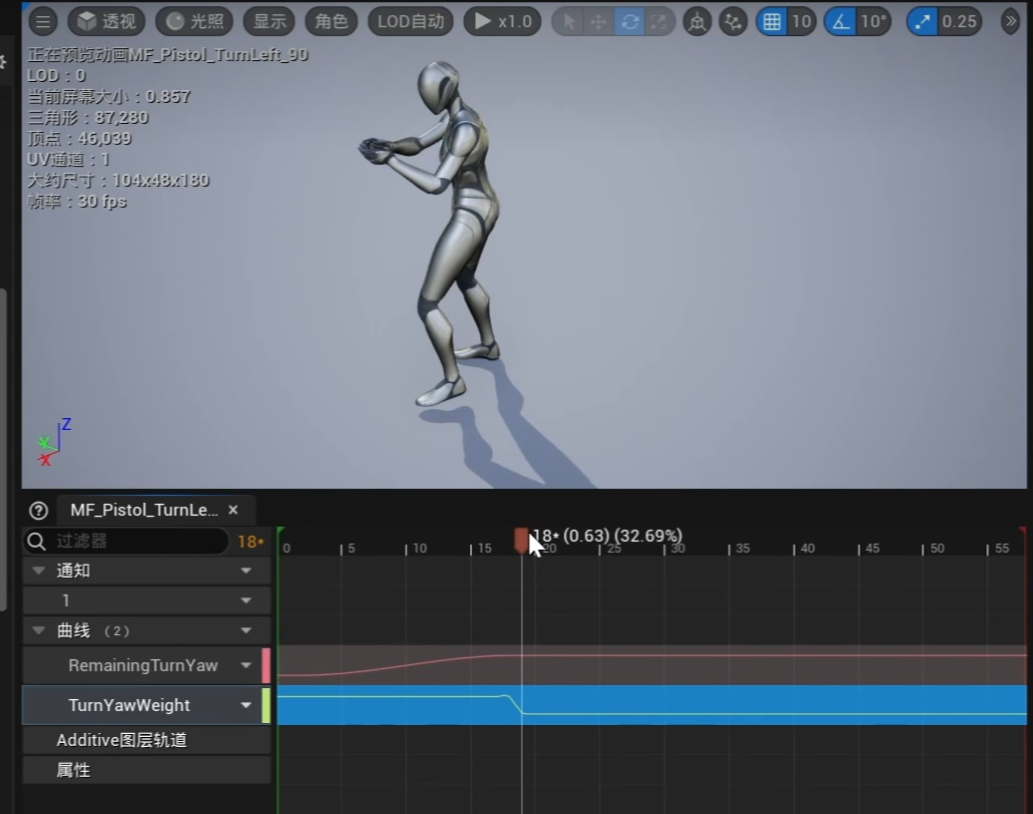
配置动画Right 和 Left
瞄准偏移
- 新建瞄准偏移资产MF_AO_Pistol
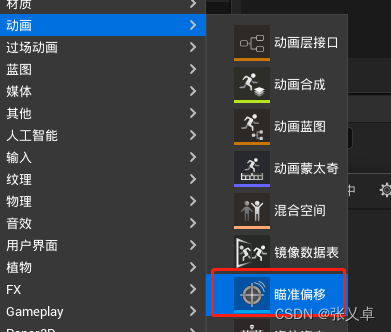
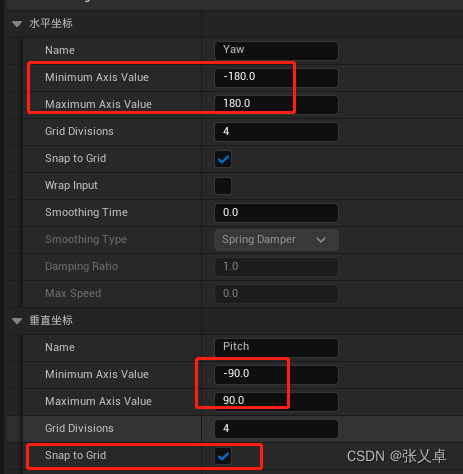
- 设置BP
- 批量操作动画 – 网格体空间

虚幻引擎中的瞄准偏移 | 虚幻引擎 5.7 文档 | Epic Developer Community
选择 网格体空间(Mesh Space) ,而非 局部空间(Local Space) 的原因在于,选择网格体空间后,可以在 骨骼网格体组件(Skeletal Mesh Component) 的空间中应用其叠加效果。这能确保无论骨骼网格体中前一个骨骼的朝向如何,旋转都朝同一方向移动。这对于瞄准偏移很重要,因为在某些情况下,无论角色的当前基础姿势如何,你可能希望来自混合空间的旋转得到一致的应用。
局部空间 是以自己的参考系处理 网格体空间是以空间(地板)为参考系处理
- 设置Blender
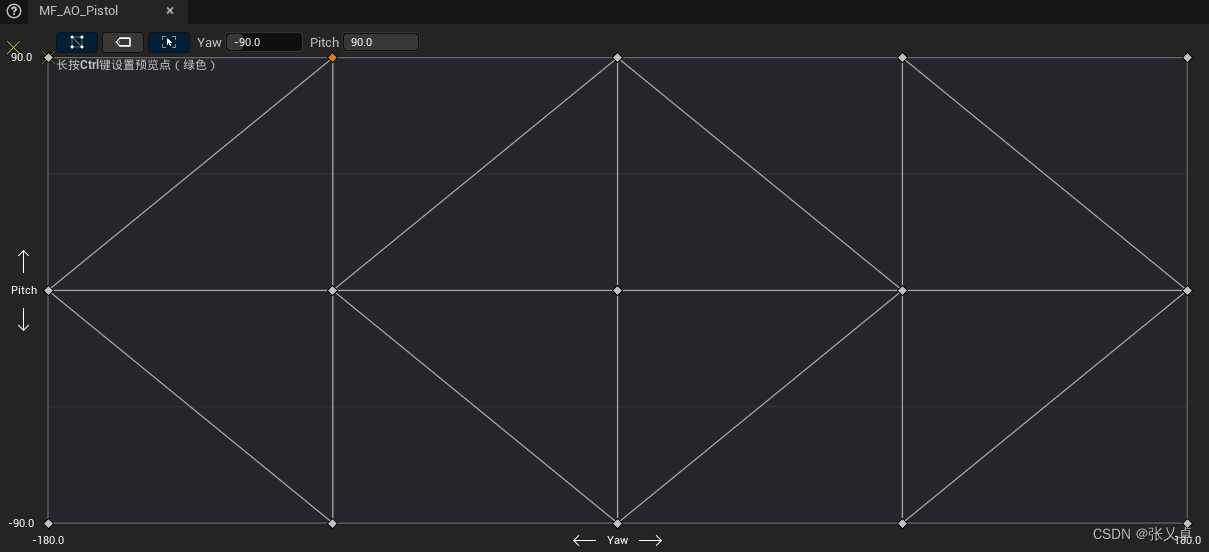
- ALI_AnimLayerInterface
新增 AimOffset
Input 参数设为 Yaw,Patch 俩个自定义参数
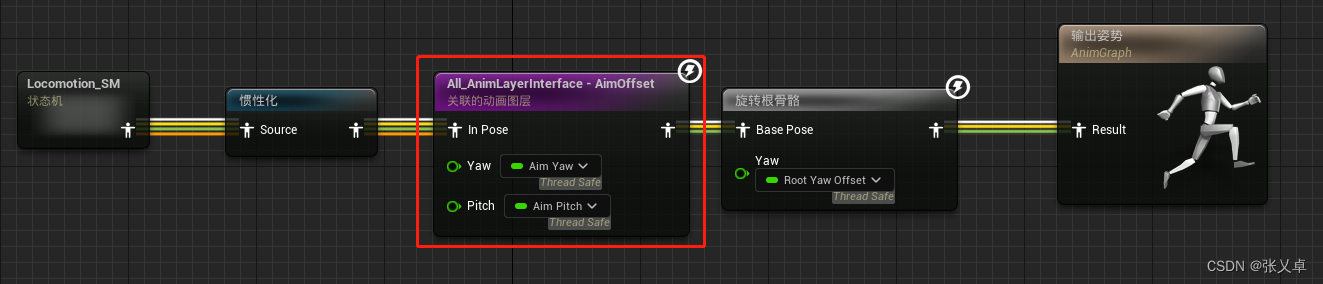
记得绑定值
ABP_CharacterBase
Update Aim Offset Data 线程安全函数
return
Yaw = Root Yaw Offset* -1.0,
Pitch = TryGetPawnOwner.GetBaseAimRotation Pitch
- ABP_ItemLayersBase > AimOffset
- Yaw ,Pitch, Aim Offset -> MF_AO_Pistol -> return
- Last
最后人物上半身会跟着鼠标摄像机走 相当于叠加一层
瞄准偏移
跳跃着陆
状态机
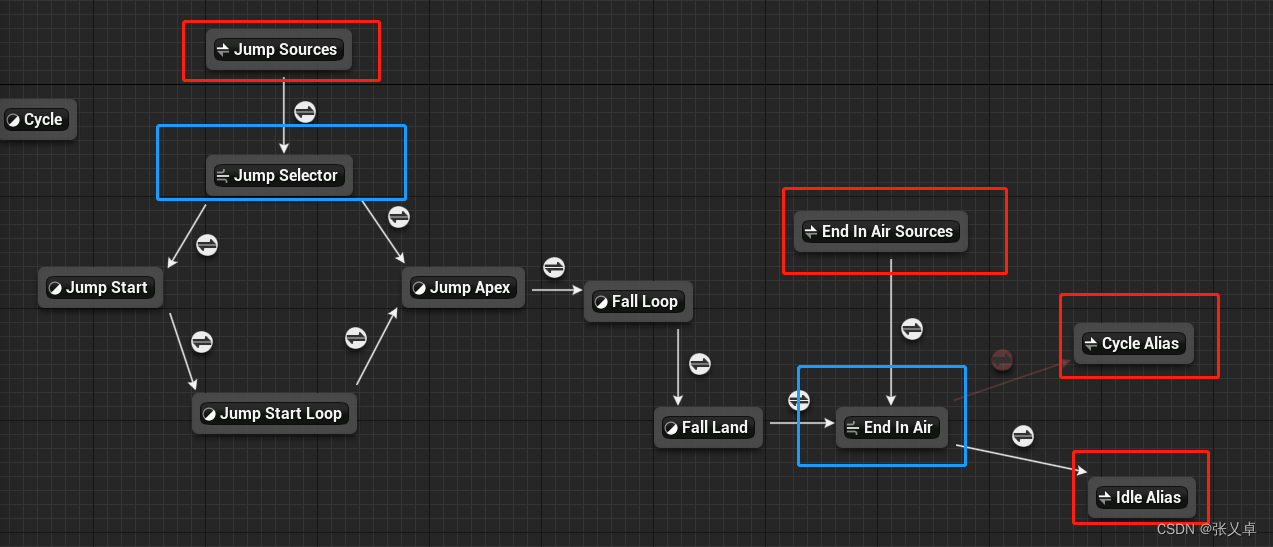
Jump Sources : All 状态别名 全状态都能跳跃
End In Air Sources :Jump Start, Jump Start Loop, Jump Apex ,Fall Loop Fall Land状态别名
红框是状态别名,可以多选存在的状态
蓝框是状态导管: 导管(Conduit)是动画状态机中的一种特殊状态,它没有任何关联的动画,而是用作状态转换的中间点。
导管的主要作用是简化状态机的复杂性,使状态转换更加清晰和易于管理
线程安全函数
Update Character State Data
- 获取是否在向上跳跃(Is Jumping) ,正在掉落(Is Falling),在地面(Is OnGround)
Update Jump Fall Data
- 获取跳到顶点的时间(Jump Apex Time),速度/重力
Update Ground Distance
- 获取到地面的距离,因为这个函数需要射线检测,不能设置成线程安全函数
- 所以这个函数放在事件图表更新 Start( )
状态机条件
| 开始 | 条件 | 结束 |
|---|---|---|
| Jump Sources | true | Jump Selector |
| Jump Selector | Is Jumping == true | Jump Start |
| Jump Start | 自动规则 | Jump Start Loop |
| Jump Start Loop | Jump Apex Time<0.400000 | Jump Apex |
| Jump Apex | 自动规则 | Fall Loop |
| Fall Loop | Ground Distane | Fall Land |
| End In Air Sources | Is On Ground < 200.00000 | End In Air |
| End In Air | Has Acceleration == true | Cycle Alias |
| End In Air | true | Idel Alias |
动画层操作
ALI_AnimLayerInterface 新增
- FullBody_JumpStart
- FullBody_JumpStartLoop
- FullBody_JumpApex
- FullBody_JumpFallLoop
- FullBody_JumpFallLand
ABP_ItemLayersBase
- Jump Fall Land 有些不一样,因为要计算落地的距离 (同距离匹配)
- Setup Fall Land Anim
- Set Explicit Time (0)
- Update Fall Land Anim
- Distance Match to Target
- Setup Fall Land Anim
注意如果自己创建动画修饰符,这个跳跃的动画距离修饰符,要把轴设置成Z

动画操作
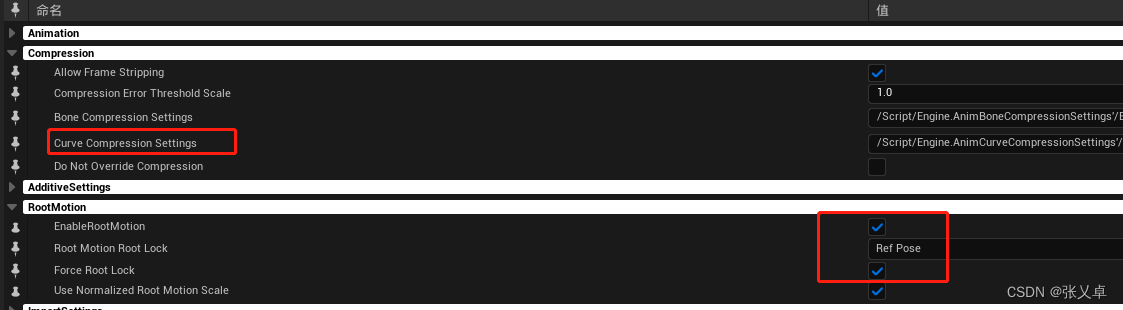
压缩所有动画
配置动画到Pivot Anim中
脚部IK
状态机
Control Rig
新建Control Rig -> CR_Foot
- 新建五个控制器,设置L和R的偏移
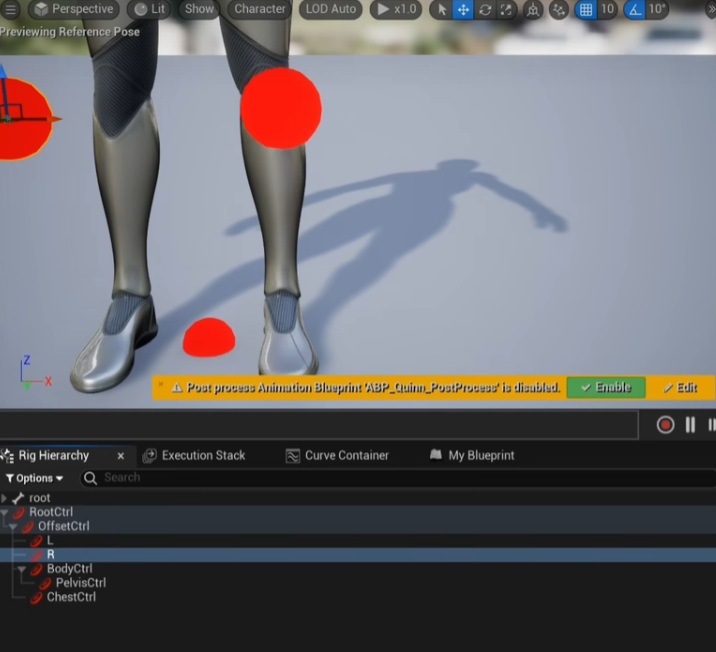
- 获取信息
| 属性 | Set Transform1 | Set Transform2 | 属性 | Parent Constraint | Parent Constraint |
|---|---|---|---|---|---|
| Type | Bone | Control | —— | Control | Control |
| Name1 | ik_foot_l | ChestCtrl | Name | L | |
| Get Transform -> Name1 | foot_l | spine_03 | Parent-Item-Name | ik_foot_l | ik_foot_l |
| Name2 | ik_foot_r | BodyCtrl | |||
| Get Transform -> Name2 | foot_r | pelvis | |||
| 备注 | 控制器约束 |
左右脚追踪
FootTrace()
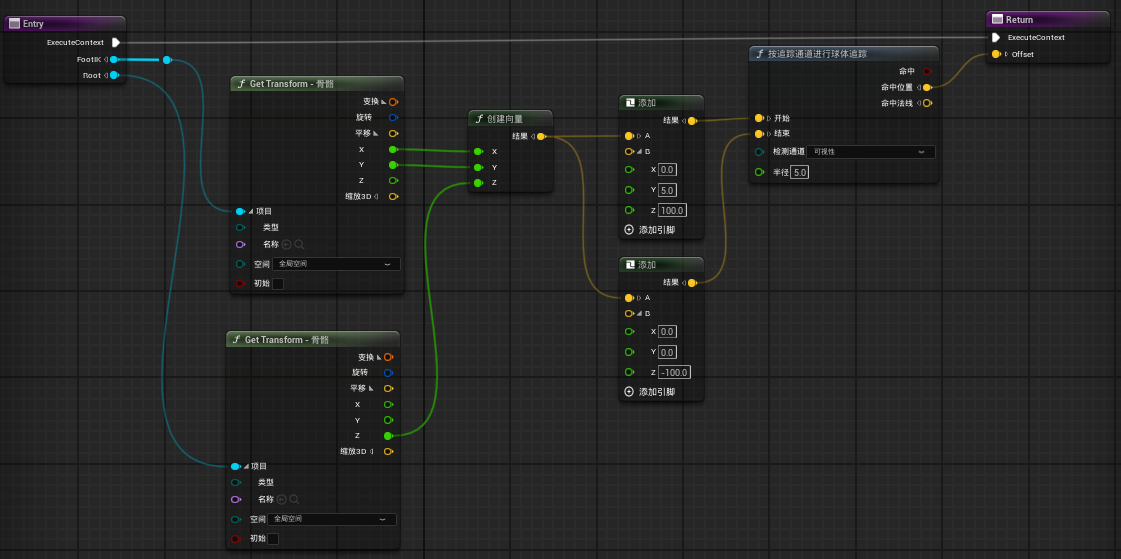
偏移关节
AlphaInterp
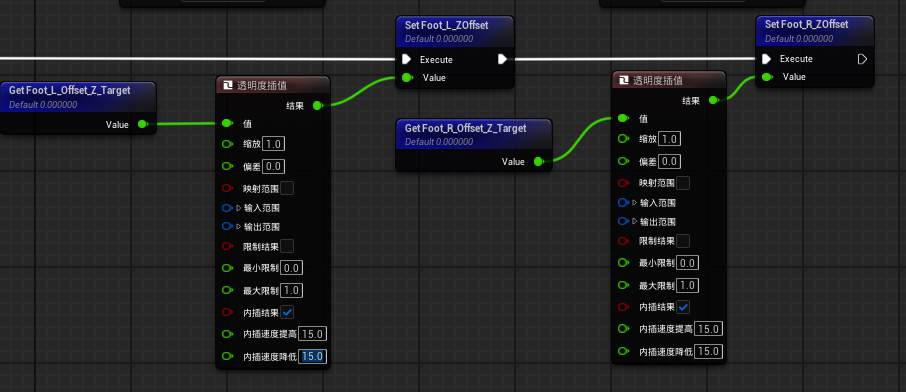
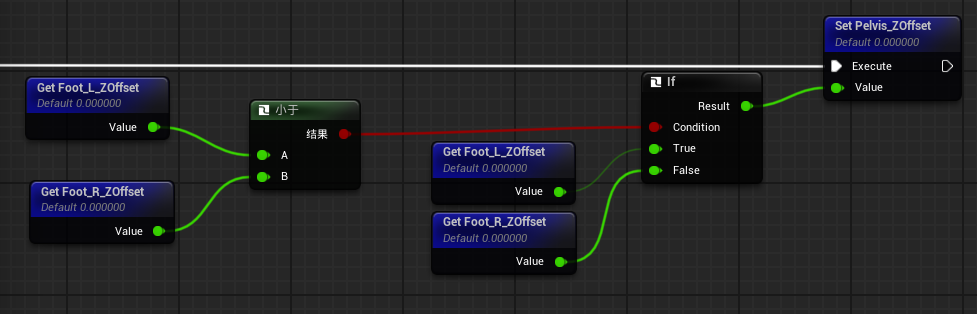
- 比较两个值,取最小的值,确定骨盆的位置
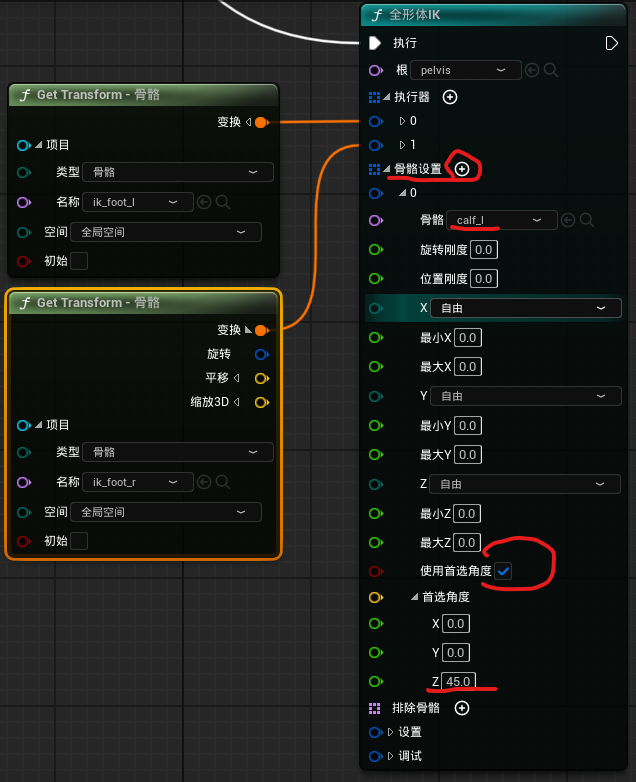
- 全身IK
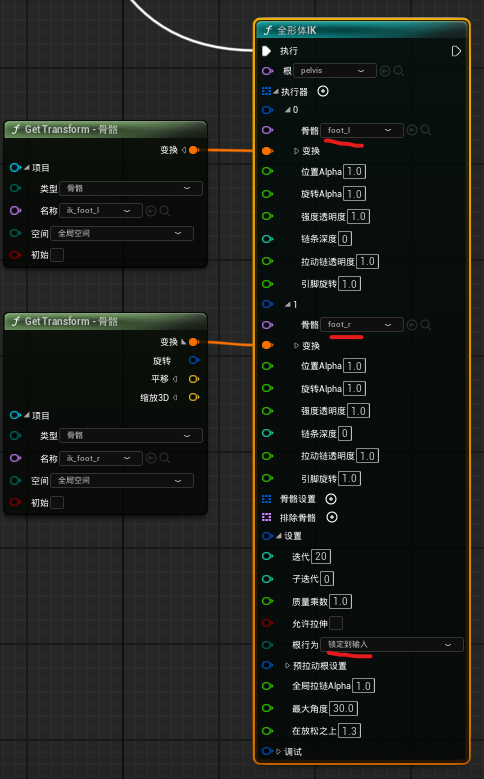
- 调整腿部设置,防止腿部乱动
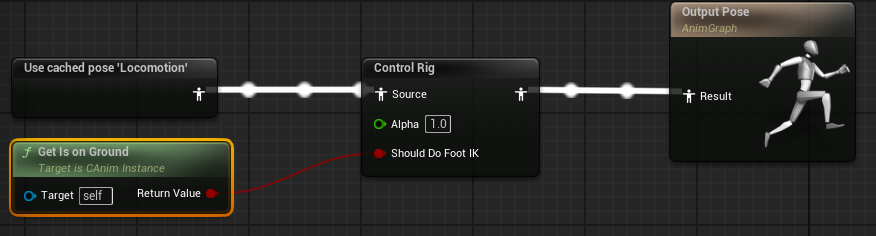
- 在斜坡跳跃时,腿不正常,我们希望在IK之前,有一个判断,当不要IK控制时,那些值设置为0:
bShouldDoFootIK
参考IK
UE5手把手制作lyra动画蓝图教程-09(脚部IK 控制绑定Control Rig)_哔哩哔哩_bilibili
UE5ControlRig脚部IK匹配地面(FootIK)的简易实现-CSDN博客
虚幻引擎UE5专用服务器游戏开发-10 添加足部IK_ue5 足部ik-CSDN博客
参考
UE4 UE5 骨骼动画 高级运动系统 (ALSV4) - 知乎
【UE教程】从零开始的Lyra动画蓝图制作+解析(简化版)_哔哩哔哩_bilibili